 XEEIN Soft
Run a TV channel from one PC.
XeeCast TV Suite is playout automation for TV stations: playlists on air with its own XeeCast Engine, on-air graphics, live streaming, recording, failover and the screens and tools of a master control room. Fifteen programs, one installer.
For Windows and Linux, 64-bit

Made for the control room
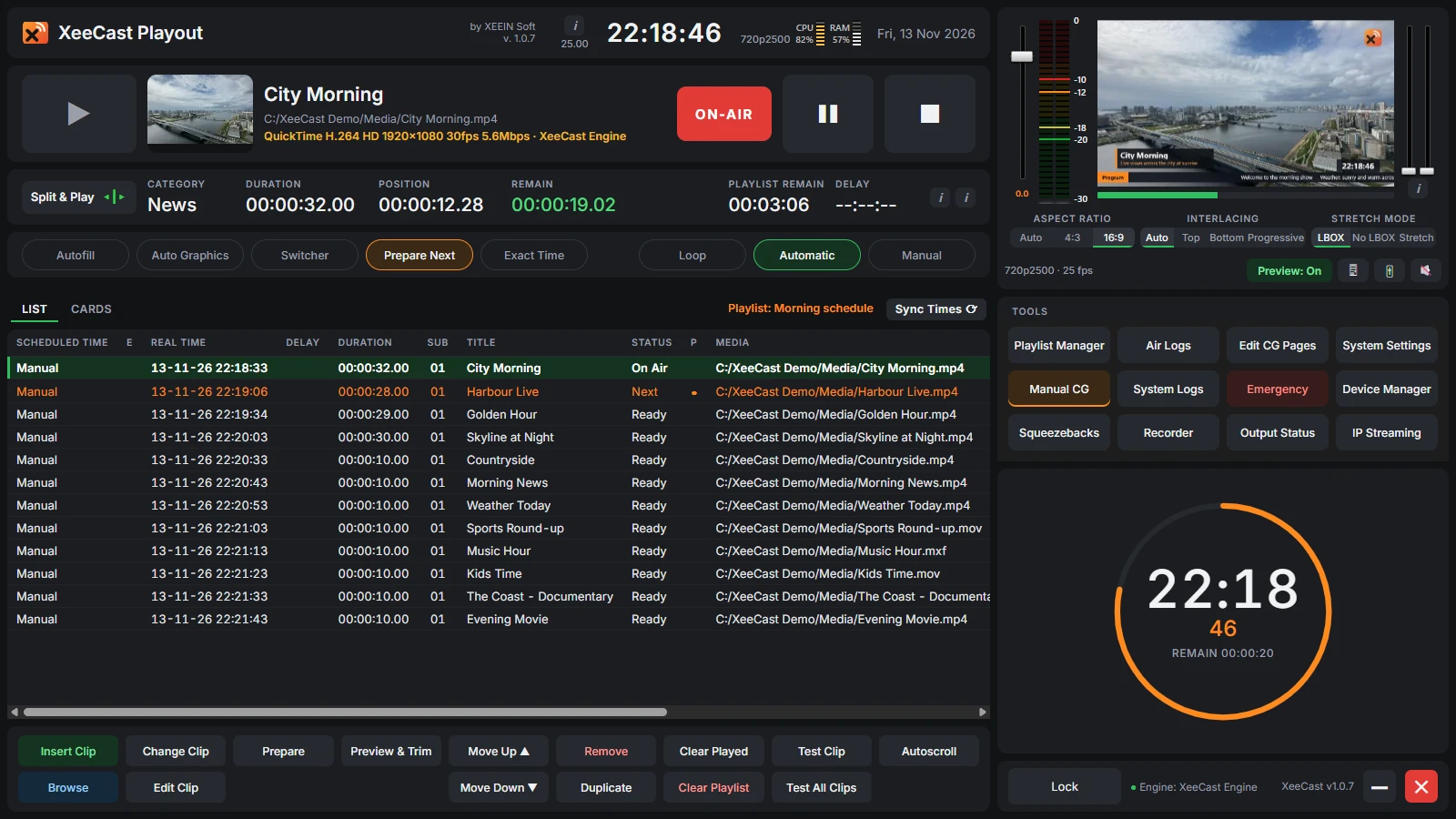
Every program has the same calm, dark look, made to be read at a glance in a dim master control room. Pick one to see it.
XeeCast Playout
XeeCast Playout
The heart of the suite. Build the day's playlist, put clips, live inputs and graphics on air, and let it run by itself — or take over by hand at any moment.

XeeCast Engine
XeeCast's own playout engine. It plays files, live inputs and graphics, and keeps playing when XeeCast Playout is closed or updated.
- Playlists on air: clips, black, live inputs and notes, with hard and soft start times, mark in / out and auto-stop. Files play from where they are.
- Outputs: a screen or HDMI display, NDI and DeckLink SDI cards.
- On-air graphics: CG pages from XeeCast CG Composer, with tickers, crawls, RSS headlines, clocks and countdowns.
- IP streaming: the on-air output to YouTube, Facebook, SRT and UDP through XeeCast Streamer.
- Emergency clips: F1 – F12 put them on air at once.
- Backup PC: a second PC follows the master and is ready to take over (System Settings → Mode Settings).
- Control from the network: GPI IN over the network for XeeCast Control Panel, Bitfocus Companion and button boxes.
- Playlists from other systems: XeeCast (
.xcpl), XPlayout (.xsc), CSV and XML. - As-run log: every item that went on air, with its result.
The programs of the suite
Each program does one job and has its own window. The tools around Playout only read it unless they are meant to control it, so a fault in one never touches what is on air.
On air
XeeCast Playout
Playout automationPlaylists, live inputs, graphics and outputs, with its own XeeCast Engine.

CG Composer
On-air graphicsDesigns on-air graphics. It runs on its own; when Playout runs, a page you save updates on air.

Streamer
Live streamingSends the on-air output to YouTube, Facebook, SRT and UDP, and connects again by itself. Closing its window does not stop the streams.

Recorder
Output recordingRecords the on-air output of XeeCast Engine into MP4 files. A fault in it never touches what is on air.

Failover
Signal watch and backupWatches up to 8 channels. When the picture goes black or freezes or the sound goes silent, the alarm sounds and the backup content goes on air through its own output.
Prepare

Planner
Playlist planningMakes playlists ahead of time, away from what is on air, checks every file and its length, and sends them to Playout.

Media Prep
Clip preparationMarks clips to the frame: in / out, intro / outro, loudness, picture, EPG text, its own CG page and subclips. Playout reads the clip card.

Capture
Ingest recordingRecords up to 8 live inputs — capture cards, DeckLink, NDI, SRT, UDP, RTMP, RTSP, HLS — as MP4 or MPEG-TS, on a schedule if wanted.

Media Sync
Media from the networkKeeps a local copy of the playlist's network files. When the server is down, Playout plays the local copy.
Control room

Studio Clock
MCR and studio screenBig figures of what is on air: remaining time in amber then red, elapsed, playlist remain, the clip and the next one.

Control Panel
Button panelDesk-style keys that control Playout on this PC or across the network, with tasks at set times.

Device Control
Switchers, routers, decksPasses commands from the network to devices on RS-232 / RS-422, TCP or UDP, with a log of every command.

As-Run
Air logWhat went on air, day by day, with problems in red and export to CSV for Excel.

Doctor
System check and supportChecks everything XeeCast needs on the PC, measures what it can handle, exports a report for XEEIN Soft and installs updates.
Get started in minutes
After a new installation, Setup offers to check the computer with XeeCast Doctor first, so a new PC's problems are found before going on air.
System requirements
| System | Windows 10 or 11, 64-bit, or Linux, 64-bit |
|---|---|
| Graphics | A graphics card with up-to-date drivers |
| Memory | 8 GB or more recommended |
| Disk | Free space for your media and recordings |
| Outputs | Screen / HDMI, NDI, DeckLink SDI |
- Install. Run the XeeCast TV Suite installer. All the programs of the suite are installed, with their shortcuts in the menu.
- Open XeeCast Playout. XeeCast Engine starts by itself. The output window button under the preview shows what is on air.
- Add your videos. Put them in the
XeeCast Mediafolder in your Videos, or anywhere you like: files play from where they are. - Build the playlist. Insert Clip (or the Insert key) opens the browser; double-click a file to add it. Select a clip and press Play.
- Set the outputs. Device Manager for screen, NDI and SDI; IP Streaming for YouTube, Facebook and other servers.
Download
XeeCast TV Suite 1.0.7
The download will be available here soon. To hear when it is ready, or to see XeeCast for your station, write to [email protected].
New in 1.0.7
- No mouse pointer on air: the on-air picture on a display (HDMI output, Engine at full screen, Failover's output) no longer shows the pointer.
- Doctor first: after a new installation, Setup offers to check the computer with XeeCast Doctor.
- Capacity check: Doctor tells which video format the PC manages, how many channels, streams and recordings at once, and the hours of HD recording left on disk.
- Faster encoding: XeeCast Engine picks the fastest H.264 encoder that works, e.g. an NVIDIA card beside the processor's own.
Support
Something not right? Open XeeCast Doctor, press Export full report and send the file to us with a few words about what happened.
- Email: [email protected]